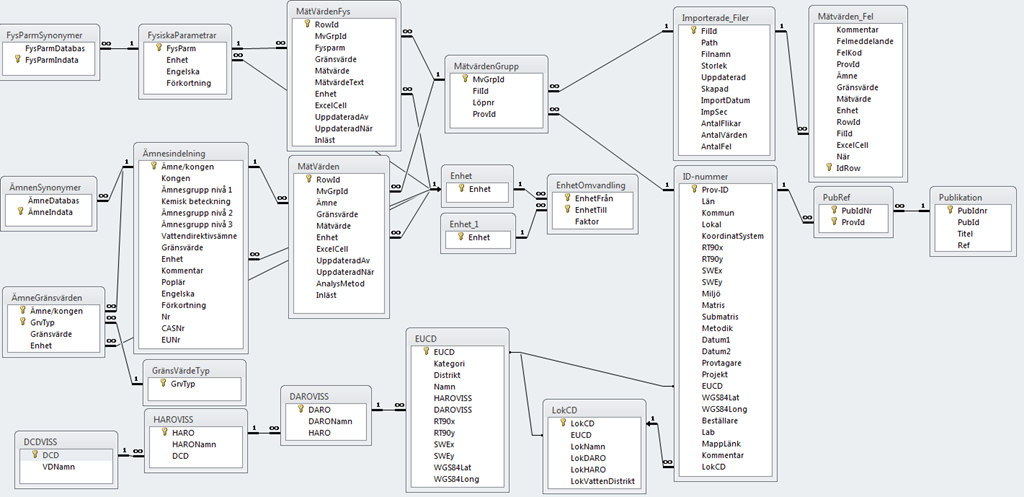
Databases are often modelled as a cylinder. I have often wondered why? The shape of a cylinder is full of harmony or is it just the fact that disk storage until recently always has had that physical shape?
Relational databases was invented some thirty years ago to better adapt to reality than the traditional hierarchical model had done so far. Many business problems could be formalized to the concept of tables and relations between tables, so I guess it is why this model has been so successful, at least if you look at the history of a company like Oracle.
Personalized by a person like Larry Ellison it is not without controversy..
 To introduce new inventions strong entrepreneurs are needed. So fact is RDB:s are popular in many cases as they had been for at least more than twenty years. The reason simply is they do adapt to reality better in many cases, not all. Confirming close to reality also often means quick payback of investment and direct business value. So let us try to find the reason why.
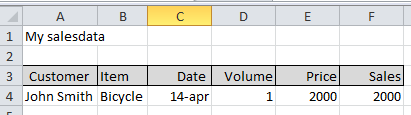
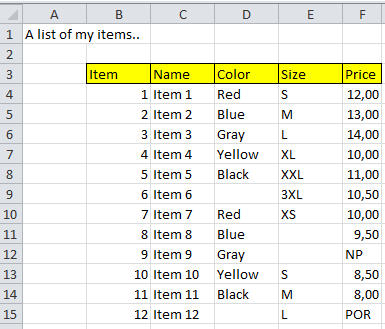
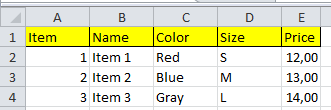
In Excel you always feel you have a good control when you see the order in a table. You describe some items with similar properties and you order them row wise and collect the same properties in the same columns. The same concept apply in a relation database. The big difference is that in Excel the rows always appear in the same order – in an RDB the order is “undefined”.  The rows are in the table, but it is up to you to say in which order you want them, in SQL this is called “Order by”. If you just ask for them they could appear in any order.. They are there that is all!
In Excel it is no big issue if you for some reason or another need to store some comments in a column that is mostly used for numbers, you just write them in. In an RDB this is a violation against the rules, is a column for numeric data you have to confirm!! This have some disadvantages but also some big advantages, if you want to have a silly computer helping you – you need consistency. In Excel there is no problem in storing item price in column B in one sheet and storing it in column D in another. The human eye immediately sees the difference and understands, if you want to explain that fact for a stupid computer you get some extra trouble. So the RDB model asks for similar information in the same column. So Excel and RDB tables look the same but behind the scene some different behaviours appear.
These differences makes it uncomfortable for us humans, when we have to change the conceptual model in our brains. We expect one behaviour from the computer and receives another…
It is called frustration, by all means…
But there are more to come. In many business problems we have to define a single occurrence of something, for example one of our products or customer or what so ever. In Excel we have very limit help in this concept, there could be many duplicates of a row in a spread sheet, Excel does not care. In a database model you could ask for help in this context, it is called Primary key. You have to define one of the properties of your entity as unique and put it into one of the columns in your model. You say I don’t want duplicates in this column, if I put them in, please don’t allow it. The big advantage of this is that you could never miss where to put updates if something changes, for example the supplier of a product. You store it in one row and when you ask you will find it there. In Excel you put it in one of the rows and next time you ask you look in the other, getting the wrong answer, because that row you have forgotten to update. This is the principle of not storing the same information in more than in one place. The true strength of the relational model. One information – one place!! This is the fundament for the reliability of databases.
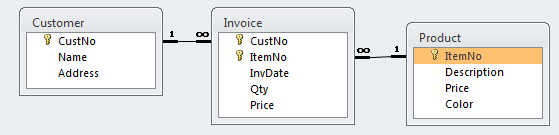
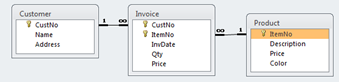 Sometimes reality needs two or more tables to describe a reasonable model of what happens. We have customers buying products from us. So we have a table of customers with some properties as address etc, and we have products with properties like colour that always is the same and price that changes, so in an RDB we store these entities in different tables.
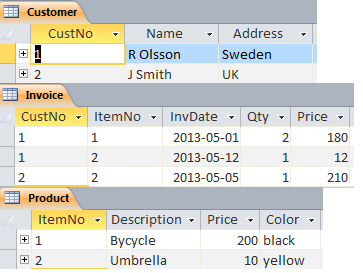
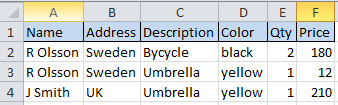
 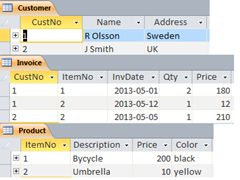 When the customers buys something we invoice them, so we need a separate table for this. So in all a first model ends up with three tables, a table with customers, and one with our products and then one table telling us when some of our customers have bought something from us so we could invoice them. Since we can’t sell a product we don’t have, we want our model to keep track on that, and we don’t want to sell to customers we don’t trust so we collect trustable in the Customer table. Now we don’t want the invoice table to contain an invoice of customer 3 buying item 3 since these doesn’t exist. In an RDB we could set up rules saying we don’t want to register invoices that are impossible, when invoicing please check we confirm to the model, not allowing 3,3. This type of rule is called a relation between tables and the property we say is called “referential integrity”, disallowing orphans to be stored. That is an invoice to a customer that don’t exist or on a product we don’t sell. This type of checking is impossible to achieve from Excel and it is our own burden to keep track of such issues. If we confirm to the relational model the computer takes care of such checking. A traditional Excel-model for this situation would probably look like: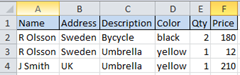
Which have the same information content, but is much more troublesome to maintain. If R Olsson moves to Denmark you must change in two places, but in an well defined RDB you change in one place only. This process is also called “Normalization” – storing one piece of information in just one place. So why then Price in both Product and Invoice table you say, that must be against the rules of normalization. Fact is these are not the same, the price in the product table is a guideline for our sales people (recommended price), but as you know the customer is always right, so when we sell with a discount, which happens, the invoice could end up in another price (actual price). So the name is the same but in reality they reflect two different aspects, that is why they should appear in two different tables, being almost the “same”. If you look closely to the example above you also see something strange, J Smith bought an umbrella for 210, this must be a typing error. These types of errors no computer could help us with, so even if the RDB-model contains a lot of help you still need humans to overlook what is happens in the model. So repeatable checking and updating by copy and paste you could delegate to the computer, but not all issues of course..
 Sorry forgot the cascading deletes.. If you define a relation between two tables you could also give rules on what you want to happen in certain situations. If you decide to stop selling a product you might want to delete that row from the product table. What should then happen to the invoice rows in the Invoice table? If you just define a relation with referential integrity the database will disallow you to delete the product, since there are rows in the invoice table with it. If you specify cascade delete the database will automatically delete all rows in the Invoice table on that product for you. This might though not always be what you want.. If you want to keep track on sales two years back. But if the dependent table is a price list giving actual price for different customer this seems to be a good idea. So it is up to you to select the correct option for the business situation you want to model.

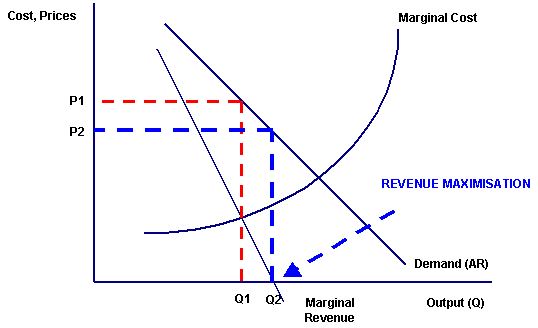 Many models for this process have been developed…
  My customers have agreements with their customer for half a year or for a quarter, when prices are supposed to be fixed. During this period unforeseen changes appear, exchange rates change, the harvest for some commodities fail due to whether conditions etc etc. So your revenue expectations change all the time. 2 to 4 times a year you have the chance to do adjustments, this is the process I will cover in some posts to follow. How to use Excel, Movex and a relational database to support this process to for helping you make the “best decisions”, or at least to a little bit better than your competitors.
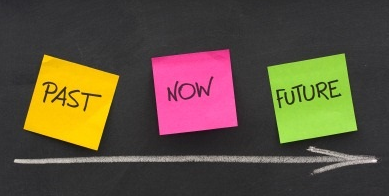 Components in this “Movex-add in” are: collect relevant historical data, display three scenarios history, now and new. History is obviously what has happened during last year, now is the scenario where you do nothing and new is the scenario where you see what will happen with the changes you suggest. The model is Excel-based and you could easily specify three types of changes % on current price, % change on margin or exact amount per kg or unit. You could specify on a specific item or on a group of items, with Excel’s easy copy and past you make your changes category by category. Whenever you like to you ask the computer about the outcome so far by asking for a simulation. The simulation performed mimic most of M3’s rather complex price setting mechanism’s as price lists, discounts and bonus, based on current settings in M3. Then after each step you could analyse the result down to price list, customer group or a specific customer to see the outcome and to make feasible adjustments.